
The best laptop with passive cooling is one that can stay comfortable and stable under your typical workload without relying on a fan, while also delivering the screen, keyboard feel, ports, and battery life you need. In practice, the top choices tend to be thin, efficient designs built around low-power processors—ideal for web browsing, office work, email, streaming, and light creative tasks.
The MacBook Air line is widely considered the safest “buy it and forget it” option for passive cooling. Its fanless design keeps operation silent, and Apple’s efficiency-focused chips help it feel quick for everyday tasks while staying relatively cool. It’s a strong fit for students, remote work, and travel because it combines quiet operation with long battery life and a sturdy build.
Some Surface Pro configurations are designed to run without a fan, making them a good match if you want a tablet-first device with a detachable keyboard. These are especially appealing for note-taking, meetings, and light productivity where silence matters. Because configurations vary by processor, it’s important to confirm the exact model is fanless before buying.
Passive cooling can still allow the chassis to feel warm during heavier loads like long video calls, big spreadsheets, or photo exports. To keep performance steady and the laptop comfortable on a desk, airflow around the base matters—especially with thin aluminum designs that use the body to shed heat.
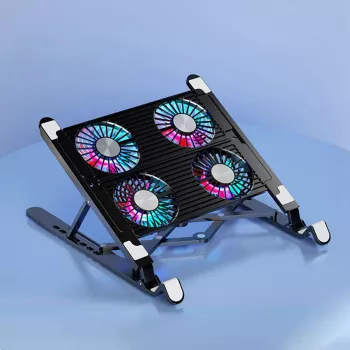
If your passive-cooled laptop sometimes gets warm, a well-designed stand can help by improving airflow and ergonomics without turning your workspace into a wind tunnel. For a practical approach to cooler temps with less noise, see this guide to a quiet quad-fan laptop stand: https://appealingtreasures.com/guide-quiet-quad-fan-laptop-stand-cooler-temps-less-noise/.
Yes—by lifting the laptop and improving airflow, many stands reduce heat buildup and can help prevent performance dips during long sessions. The biggest gains typically come from better ventilation and a more open underside, especially on thin laptops.






Leave a comment